
Print and share
Connect your Bluetooth printer, print receipts, and send them on WhatsApp.
Fawaterna prints on thermal receipt printers over Bluetooth.
Connect the printer
- Turn the printer on and pair it with your phone in the phone's Bluetooth settings.
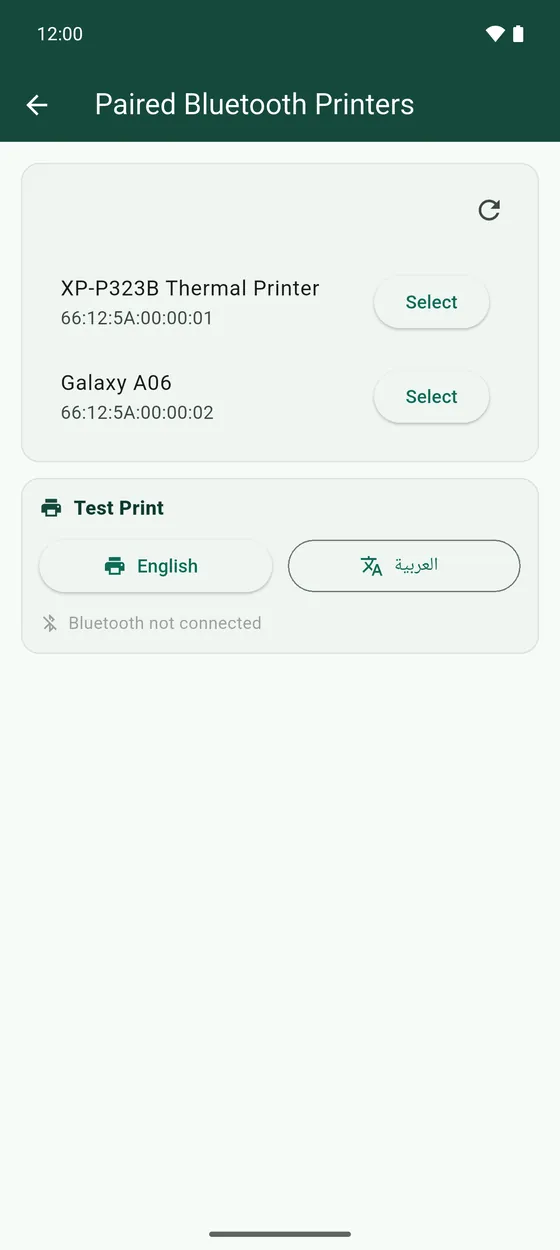
- In Fawaterna, open the side menu, then App settings → Paired Bluetooth Printers, and tap Select next to your printer.
- Choose the Paper width your printer takes, 58 mm or 80 mm. The wrong one cuts the receipt off.
- Under Test Print, tap English to print a test page. The العربية button tests printing in Arabic.
Print and share receipts
- On the register, Print saves the new receipt and prints it.
- In Receipts, every receipt has buttons to print it again, send it on WhatsApp, or delete it.
- Press and hold a receipt to select several, then print or delete them together.